
A character that stands still looks finished. A character that moves is where the truth comes out. Weight, intent, personality, all of it lives in motion, and 3D character animation is the discipline that decides if a game’s hero feels like a living presence or a textured mannequin being dragged across the screen by code.
This guide covers what actually goes into 3D character animation for games, how it differs from film animation, the pipeline from rig to in-engine blend, and what separates animation that sells a character from animation that merely moves one.
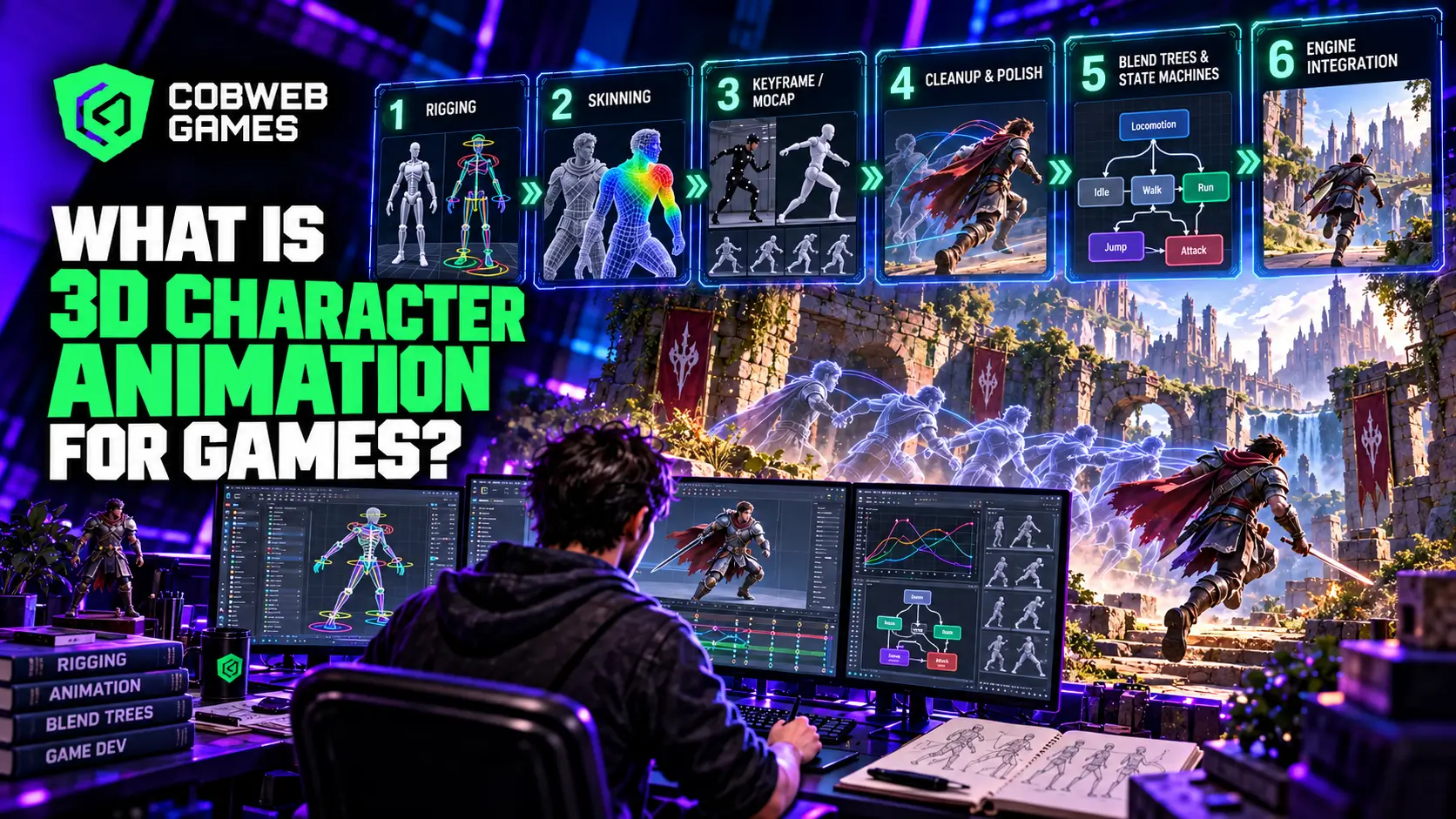
The Pipeline at a Glance
| Stage | What Happens | Typical Owner |
| Rigging | Building the skeleton and control system a character will animate through | Rigging artist or technical animator |
| Skinning | Binding mesh geometry to the rig so it deforms correctly | Rigging artist |
| Keyframe or mocap capture | Producing the raw animation data | Animator or mocap team |
| Cleanup and polish | Refining timing, arcs, and secondary motion | Animator |
| Engine integration | Setting up blend trees, state machines, and transitions | Technical animator or gameplay programmer |
Each stage depends on the one before it holding up. A rig built without animation needs in mind creates friction for every animator who touches it afterward, and a cleanup pass can only polish what the underlying capture or keyframe data actually contains.
For studios building production-ready characters, professional 3D game animation services typically cover this full pipeline from rigging and movement creation through cleanup and engine integration.
Why Game Character Animation Is a Different Problem Than Film Animation?
Film animation answers to a camera that never moves during playback. Game character animation answers to a player who might approach the exact same action from any angle, interrupt it halfway through, or chain it directly into a completely different action a fraction of a second later. That constraint changes almost everything about how animation gets built for games.
This distinction becomes even clearer when looking at the broader principles behind 3D game animation, where every movement has to work within real-time gameplay constraints.
Responsiveness competes with weight. A punch animation with a long, satisfying windup reads beautifully in a cutscene. In active gameplay, that same windup can feel unresponsive and frustrating if a player expects their input to register immediately. Game character animators constantly negotiate between motion that looks and feels weighty and motion that responds fast enough to keep gameplay feeling fair.
Everything needs to blend into everything else. A film animator finishes one continuous performance. A game animator builds dozens of individual clips, walk, run, jump, land, turn, that all need to transition into each other smoothly regardless of which clip a player happens to trigger next, since the actual sequence of player inputs can’t be fully predicted in advance.
Loops never get to rest. A character’s idle animation might play for literal hours across a single session, and any visible seam or repetitive tell becomes exhausting over that kind of exposure in a way a single-viewing film shot never has to survive.
Rigging: The Skeleton Everything Else Depends On
A rig is the underlying control structure, joints and controllers, that lets an animator pose and move a character. Game rigs carry a few specific requirements film rigs don’t always share. They need to stay lightweight enough to run efficiently across potentially dozens of characters on screen simultaneously, which rules out some of the heavier simulation-driven rigging techniques common in film production.
Standard biped rigs following conventional humanoid proportions animate the fastest and transfer most easily between characters sharing a similar build, a major advantage for games with large rosters. Non-standard rigs, creatures, characters with extra limbs, stylized proportions, demand custom setup and generally can’t reuse animation data built for a standard biped, which is why a production’s early decisions about character design directly affect downstream animation cost and timeline.
This is why professional 3D character modeling services should account for topology, deformation, and rigging requirements before the finished character ever reaches an animator.
Blend Trees and State Machines: Where Animation Meets Code
This is the part of 3D character animation for games that has no real equivalent in film production. A blend tree smoothly interpolates between multiple animation clips based on a parameter, speed, for instance, so a character’s run cycle gradually shifts from a walk to a jog to a sprint rather than snapping jarringly between three separate, disconnected clips. A state machine governs which animations can play and when, defining, say, that a character can transition from idle to attack but can’t transition directly from attack into a reload animation without passing through a recovery state first.
Getting this layer right is where a lot of otherwise solid character animation quietly falls apart in actual gameplay. Beautiful individual clips mean little if the transitions between them look stiff, pop unnaturally, or allow combinations a game’s own rules shouldn’t permit. Technical animators spend a significant share of their time here, making the existing clips cooperate correctly inside the game’s actual logic rather than producing new ones.
Blend trees and state machines are just one part of the broader game animation pipeline, which also includes rigging, retargeting, animation creation, cleanup, and engine implementation.
Motion Capture Versus Hand-Keyframed Animation for Characters
| Approach | Strengths | Limitations |
| Motion capture | Fast production of naturalistic human movement at volume | Needs cleanup, struggles with stylized or physically impossible motion |
| Hand-keyframed | Full creative control, handles any style or movement type | Slower per clip, demands skilled animator time throughout |
| Hybrid | Mocap base with keyframed polish and exaggeration layered on | Requires animators fluent in both workflows |
Neither approach is universally superior, and most serious productions blend both depending on what a specific character or action calls for. For productions that need natural human movement at scale, professional motion capture animation services can handle capture cleanup, retargeting, and final animation polish before the clips enter the game engine.
A grounded military shooter leans naturally toward motion capture for its realistic combat movement. A stylized platformer with a bouncy, exaggerated hero is almost always better served by hand-keyframed animation, since no human performer can physically move the way a cartoon character is supposed to move.
Choosing between mocap, keyframe, and hybrid workflows also becomes an important production decision when considering game animation outsourcing, since the right external team depends heavily on the animation method your project actually needs.
Character Movement: Root Motion Versus In-Place Animation
How a character’s actual movement through the world gets driven is one of the quieter decisions in 3D character animation, and it shapes gameplay feel more than most teams expect going in. Root motion lets the animation clip itself drive a character’s position; the character physically travels the distance an animator built into the walk or run cycle, producing movement that looks naturally connected to the ground. In-place animation instead plays the movement clip on a fixed spot while a separate gameplay system handles actual position and velocity, giving designers more direct, precise control over speed and distance traveled.
Root motion tends to look more organic since every foot plant is baked directly into the animation data itself, but it hands less precise control to gameplay systems, a real problem for genres demanding tight, responsive character movement like competitive shooters or precision platformers. In-place animation sacrifices some of that organic foot-plant feel in exchange for movement speed and distance a designer can tune independently of whatever an animator originally built into a clip. Many modern productions blend both, using root motion for weighty, deliberate actions like heavy attacks or climbing, and in-place systems for a character’s everyday locomotion where responsiveness matters more than perfect foot placement.
3D Game Characters Across Genres
The actual animation demands placed on 3D game characters shift considerably by genre, and recognizing those differences early shapes staffing and budget decisions well before production starts in earnest.
Action and combat games need the deepest animation sets by far, often spanning dozens of distinct attacks, dodges, and reaction animations layered with precise hit-reaction timing that has to feel immediate without undercutting a weapon’s sense of impact.
Narrative-driven adventure games lean heavily on facial animation and subtle, understated body language, since a huge share of emotional storytelling in these titles rides on quieter performance details rather than big, showy combat movement.
Sports and racing titles depend on a smaller core movement set executed with exceptional polish, since players see the same handful of animations repeatedly across an entire match or race, and any visible flaw compounds with every repetition.
Multiplayer and competitive games prioritize animation that reads instantly and clearly from an opponent’s perspective, since a hard-to-read wind-up or recovery animation creates genuine unfairness in a competitive setting where milliseconds of clarity actually matter.
Secondary Motion: The Detail That Sells a Character
Primary motion is the core action: a run, a jump, a swing. Secondary motion is everything that reacts to that primary action afterward: hair settling, a cape trailing, cloth rippling as a character lands. This layer is easy to skip under time pressure and genuinely costly to skip creatively, since its absence is precisely what makes a character read as stiff even when the primary animation itself is technically well made.
Modern engines increasingly handle some secondary motion through real-time physics simulation rather than hand animation, with cloth and hair solvers that react dynamically to a character’s movement without needing every ripple keyframed by hand. This reduces animator workload for secondary motion specifically, though it introduces its own tuning challenge, since unconstrained physics can just as easily produce distracting, unnatural jitter if left unbounded.
Performance Budgets: Animation Has a Cost Too
Animation is sometimes treated as a purely creative discipline during early planning, with its actual runtime performance cost only becoming a visible concern once a game is already deep into production and frame rate problems start surfacing. That’s backward. Every bone in a rig, every blended animation layer, and every physics-driven secondary motion effect consumes real processing budget, and a roster of dozens of characters on screen simultaneously multiplies that cost fast.
Level of detail for animation mirrors the same concept used for visual geometry. Characters close to the camera run full rig complexity and full blend tree sophistication, while distant background characters switch to simplified rigs with fewer bones and cheaper, less frequently updated animation logic, since a player several screens away never notices the reduced fidelity.
Animation compression reduces the memory footprint of stored animation data, trimming redundant keyframes and quantizing rotation data without introducing visible quality loss, a meaningful consideration for any project shipping a large roster of characters with extensive movesets.
Update frequency throttling for off-screen or distant characters, running their animation logic less often than fully visible on-screen characters, is a common technique for keeping a crowded scene’s total animation cost within budget without visibly compromising what the player is actually looking at.
Mobile projects feel these constraints earliest and most acutely, but even console and PC titles with ambitious crowd scenes or large-scale battles run into the same wall eventually. Planning for this early, rather than discovering it during a late optimization pass, keeps a project from needing to strip animation fidelity out of a nearly finished game under deadline pressure.
Facial Animation and Lip Sync: A Discipline of Its Own
Facial animation for game characters, particularly anything with substantial dialogue, has become specialized enough to be its own distinct skill set within character animation broadly. Lip sync alone demands careful attention to phoneme timing, while believable facial performance layers emotional expression on top without sliding into an uncanny, unsettling middle ground between clearly stylized and attempting full realism.
Games with heavy dialogue increasingly use a mix of facial motion capture for principal characters and simplified, blend-shape-driven systems for secondary characters, a tiering approach that mirrors how budget gets allocated across full-body character animation more broadly.
Cobweb Games’ Approach to Character Animation
Every character animation engagement starts by mapping exactly how many distinct actions a character actually needs and which of those actions genuinely benefit from motion capture versus hand-keyframed work, since that single decision shapes cost, timeline, and achievable creative range more than any other early choice. Studios working with Cobweb Games on 3D animation get animation services built around their actual rig complexity and roster size rather than a flat approach applied regardless of what a specific project calls for.
Projects also needing foundational 3D character modeling work benefit from planning both disciplines together from the outset, since a character modeled without animation and rigging constraints routinely produces deformation problems that surface only once real animation work begins.
Common Mistakes in Character Animation for Games
Treating blend tree and state machine setup as an afterthought. Beautiful individual clips underdeliver badly if the transitions connecting them feel stiff or allow combinations the game’s own design never intended.
Skipping secondary motion entirely under deadline pressure. This is one of the most visible tells that separates animation that feels alive from animation that feels technically correct but lifeless.
Using the same rig complexity for every character regardless of screen time. A background character rarely needs the same facial rig sophistication as a game’s central protagonist, and tiering rig complexity by narrative importance keeps a full roster’s animation budget sustainable.
Finalizing animation before gameplay feel is locked. Polishing animation timing against gameplay mechanics that are still changing wastes real animator effort, since those mechanics shifting later often demands reworking the very timing just finished.
Ignoring performance budget until optimization crunch. Treating rig complexity and animation cost as a late-stage concern instead of an early planning input routinely forces a team into painful, last-minute quality cuts across an entire character roster.
Frequently Asked Questions
How many animations does a typical game character need?
It varies enormously by role and genre, but a fully realized player character in an action game commonly needs anywhere from thirty to over a hundred distinct animations once combat, traversal, and contextual reactions are all accounted for.
Is motion capture always cheaper than hand-keyframed animation?
Not automatically. Raw capture can be fast, but cleanup work afterward adds real cost, and for stylized or physically impossible movement, hand-keyframing is often the only practical option regardless of budget.
Do mobile games need the same animation quality as console games?
The underlying craft principles stay the same, but mobile projects typically work with simpler rigs and fewer total animations to stay within tighter performance budgets, prioritizing the actions players see most often.
What makes character animation look “floaty” or unconvincing?
Usually a mismatch between a character’s visual weight and how quickly or slowly it accelerates and decelerates during movement, alongside missing secondary motion that would otherwise ground the action in physical believability.
Can an existing animation set be reused across different characters?
Often, yes, provided the characters share a compatible rig structure and proportions. This retargeting approach is standard practice for extending a shared animation library across an entire enemy roster efficiently.
Should root motion or in-place animation be used by default?
Neither is a universal default. Root motion suits weighty, deliberate actions where organic foot placement matters most, while in-place systems fit everyday locomotion where designers need precise, independent control over character movement speed and distance.
