
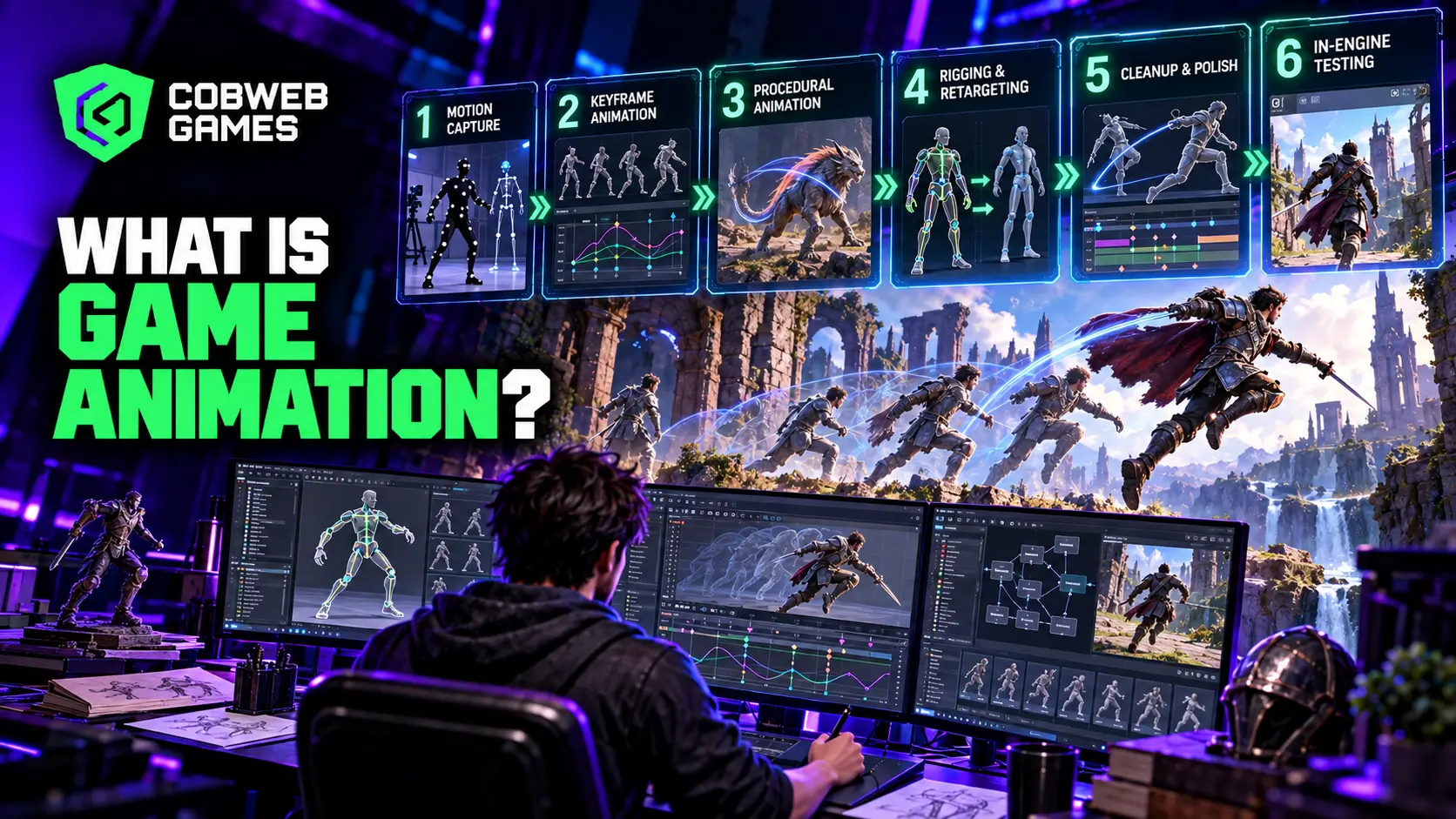
Watch a character in a modern game leap, land, stumble slightly, and recover their footing, and you are watching dozens of individual technical decisions working together so seamlessly that none of them register consciously. Game animation is the discipline behind that seamlessness: bringing characters, creatures, and interactive elements to life within a game’s engine, under constraints that traditional film and television animation never has to solve. A game does not play back a fixed sequence of frames; it has to respond to a player’s input in real time, which makes this work as much an engineering problem as an artistic one.
Game Animation, Defined
Game animation is the process of creating movement for characters, objects, and effects within an interactive game engine, built specifically to respond dynamically to player input and gameplay state rather than playing back as a single, fixed, predetermined sequence. This real-time responsiveness is the defining characteristic that separates it from film animation, where every frame is locked in advance, and the audience has no influence over what happens next.
What makes this work fundamentally different from film or television animation:
- Animations need to blend smoothly into and out of each other based on unpredictable player actions, not play in a fixed, known order.
- The same animated action needs to work correctly regardless of camera angle, terrain, or the specific gameplay context it triggers in.
- Performance budgets constrain animation complexity in ways a pre-rendered film sequence never has to consider.
- Animators typically work with a state machine or blend tree architecture rather than a linear timeline, since the actual sequence of events depends on what the player does.
The Three Core Methods of Creating Game Animation
Every animated action in a game originates from one of three fundamentally different production methods, and understanding the real tradeoffs between them shapes both budget and creative decisions across an entire project.
Motion capture records real human performers wearing tracked suits, translating their physical movement directly into raw animation data. It is genuinely fast for producing naturalistic, believable human movement at scale, but the raw capture data almost always requires real cleanup work, fixing foot sliding, removing tracking noise, and solving artifacts, before it is actually usable in a game.
Keyframe animation builds movement by hand, frame by frame or pose by pose, inside software like Maya, Blender, or MotionBuilder. It takes considerably longer per individual clip than motion capture, but it offers complete artistic control and is the only practical method for stylized, exaggerated, or physically impossible movement that no human performer could ever actually execute.
Procedural animation generates movement algorithmically at runtime rather than from any pre-recorded or hand-built animation asset at all. A character’s feet adjusting automatically to uneven terrain, or a creature’s tail reacting physically to sudden movement, are typical procedural animation applications, and this approach shines specifically in situations where the sheer number of possible scenarios makes hand-animating every variation impractical.
| Method | Speed | Artistic Control | Best Suited For |
| Motion capture | Fast for naturalistic movement | Moderate, requires cleanup | Realistic human locomotion, large volumes of similar movement |
| Keyframe | Slower per clip | Complete creative control | Stylized characters, impossible or exaggerated movement |
| Procedural | Instant, generated at runtime | Rule-based, less direct control | Terrain adaptation, physics reactions, dynamic secondary motion |
Most modern productions blend all three methods deliberately rather than committing to a single approach across an entire project, using motion capture for baseline human locomotion, keyframe work for stylized hero moments and cinematic beats, and procedural systems for the countless small adaptive details that would be impossibly expensive to hand-animate individually.
The Real Production Pipeline Behind Every Animated Action
A well-run animation pipeline follows a defined sequence of stages, and skipping or rushing any one of them tends to surface as a visible quality problem later, often after considerably more time and budget has already been invested.
Stage 1: Brief and Asset List. Documenting exactly what animations are needed, their priority, the intended source method, and any technical constraints, maintained in a shared tracking system the whole team can reference.
Stage 2: Capture or Creation. Content actually gets produced through motion capture, keyframe work, or a procedural system, depending on what the brief called for.
Stage 3: Retargeting. Animation data from any source has to be mapped onto the game’s specific character skeleton, translating bone positions and rotations from the source rig onto the target rig correctly.
Stage 4: Cleanup and Polish. Foot planting corrections, root motion extraction, loop alignment for animations that need to repeat seamlessly, curve smoothing, and secondary motion refinement all happen here.
Stage 5: Implementation. The finished animation gets integrated into the engine with correct naming conventions and slotted into the game’s state machine architecture.
Stage 6 through 8: Review, Testing, and Ship. In-context validation confirms the animation actually reads correctly during real gameplay, not just in an isolated preview window, followed by QA verification and final compression for deployment.
Character Animation: Where Technical Rigging Meets Performance
Character animation specifically demands a rigging foundation strong enough to support everything animated on top of it, and problems introduced at the rigging stage tend to compound through every later stage of production rather than staying contained.
What a strong character rig needs to support:
- A skeleton structure detailed enough for the intended range of movement, without excessive complexity that slows every subsequent animation pass down unnecessarily.
- Facial rigging capable of the expressiveness a game’s narrative ambitions actually require, considerably more demanding for a dialogue-heavy narrative title than for a character seen only from a distance.
- Retargeting compatibility, since a rig built without retargeting in mind creates real friction later if motion capture data or shared animation libraries need to map onto it,
- Physics-ready joint setups for any secondary motion, cloth, hair, accessories, that need to react believably to the primary animation.
This is exactly the kind of foundational technical work that connects directly to broader 3D character modeling and character design decisions made earlier in a project, since a character modeled without animation constraints in mind routinely creates rigging problems that ripple forward into every animated action built afterward.
What a Modern Game Animator Actually Needs to Know?
A game animator today typically carries a broader technical skill set than the role demanded even a decade ago, since the job increasingly spans traditional animation principles alongside real engine implementation work that used to sit entirely with programmers.
Core competencies a strong game animator brings to a production:
- Traditional animation fundamentals, weight, timing, arcs, anticipation, applied specifically within the constraints real-time playback imposes.
- Working knowledge of state machine and blend tree architecture, since a modern game animator increasingly needs to understand how their clips actually get triggered and blended in-engine, not just how they look in an isolated preview.
- Rigging literacy sufficient to communicate clearly with technical riggers about what a character’s skeleton needs to support.
- Comfort collaborating directly with engineers on retargeting, compression, and performance budget tradeoffs, rather than treating those as someone else’s problem entirely.
This broadened skill set is exactly why studios increasingly treat animation as a specialized discipline requiring genuine engine fluency, not simply artistic talent transplanted from film or traditional animation backgrounds without adaptation.
Retargeting and Cleanup: The Unglamorous Work That Actually Determines Quality
Retargeting and cleanup rarely get much attention outside the animation team itself, but this stage is frequently where the real difference between a professional-feeling game and an amateurish one actually gets decided.
Common retargeting and cleanup tools referenced across the industry:
- MotionBuilder, widely used specifically for its HumanIK characterization system that simplifies mapping motion capture data onto different skeleton structures.
- Maya paired with HIK, Human IK, tools for the same retargeting purpose within a more general-purpose animation package.
- Unreal Engine’s built-in IK Retargeter, which supports batch processing across multiple characters and animation clips simultaneously.
- Blender’s Auto-Rig Pro, a popular option for smaller or budget-conscious productions needing robust rigging and retargeting tools.
Foot sliding correction alone deserves specific mention, since it is one of the most common and most immediately noticeable animation quality problems players actually notice, even when they cannot articulate exactly what looks wrong. A character whose feet visibly skate across the ground during a walk cycle breaks the illusion of weight and physical presence almost instantly, regardless of how detailed the character model itself looks.
Video Game Animation and the Gameplay-Cinematic Divide
Video game animation splits into two related but genuinely distinct production tracks that a studio needs to plan for separately: gameplay animation and cinematic animation.
Gameplay animation has to function correctly under real-time, unpredictable conditions, blending smoothly between states based on player input, working across every camera angle the game allows, and staying within a strict performance budget since it runs continuously during active play.
Cinematic animation, used in cutscenes and scripted sequences, has considerably more creative freedom since the camera angle, timing, and sequence are all fixed and known in advance. This allows for more elaborate, film-quality animation work that would be impractical or impossible to achieve under gameplay’s real-time constraints.
A studio planning its animation budget needs to account for both tracks distinctly, since the skills, tools, and even the underlying technical approach frequently differ meaningfully between them, and treating cinematic animation quality as the benchmark for what gameplay animation should look like sets an unrealistic and expensive expectation that real-time performance constraints simply cannot support.
Animation Services and What a Studio Should Actually Ask For
Studios seeking outside animation services benefit from understanding these production realities before requesting a quote, since a vague request for animated characters leaves enormous room for miscommunication about scope, method, and quality expectations.
Questions worth clarifying before engaging any animation services partner:
- Which specific method, motion capture, keyframe, or procedural, does the intended scope actually call for, and does the partner have real, demonstrated expertise in that specific method?
- What retargeting and cleanup process do they use, and does it match the game’s actual target rig and engine?
- How do they handle the gameplay-versus-cinematic distinction, and do their deliverables come already integrated with the correct state machine architecture, or as raw clips requiring separate implementation work?
- What does their review and revision process look like, and how many iteration passes are included before additional rounds are billed separately?
A partner who cannot answer these clearly, or who treats “we do character animation” as a sufficient answer without specifics, is signaling exactly the kind of scope ambiguity that leads to costly rework once real deliverables start arriving and clearly do not match what the studio actually needed.
Budgeting Realistically for a Character Animation Set
Studios scoping this kind of work for the first time frequently underestimate total cost because they count only the visible hero moments, a signature attack, a special ability, and forget the enormous volume of connective animation a character actually needs to feel complete: idle variations, transition blends, hit reactions, and death animations that rarely make it into a trailer but consume real production time regardless.
What a realistic scope for an animated character actually includes beyond the obvious highlights:
- Locomotion sets covering multiple speeds and directions, since a character that only walks forward convincingly but looks broken moving sideways or backward undermines the whole illusion.
- Transition animations blending between major states, idle to walk, walk to run, standing to crouching, that players notice immediately when missing, even if they cannot name what feels wrong.
- Reaction animations for taking damage, staggering, and dying, which need enough variation that repeated use does not start feeling mechanically repetitive.
- Idle variation sets, since a character standing perfectly still and identical for more than a few seconds reads as lifeless rather than simply at rest.
A quote that only accounts for the flashy, marketable moments and skips this connective tissue will look attractively low upfront and then require considerable additional budget once the studio realizes how much unglamorous but essential work remains before the character actually feels finished in real gameplay.
Common Mistakes in Game Animation Production
Treating motion capture data as immediately usable without cleanup. Raw mocap data almost always needs foot sliding correction, noise reduction, and artifact solving before it is genuinely production-ready.
Building character rigs without retargeting compatibility in mind. This creates real friction later whenever motion capture data or a shared animation library needs to map onto a character built without that consideration from the start.
Underbudgeting cinematic-quality work applied to gameplay animation. Real-time performance constraints mean gameplay animation cannot match cinematic animation’s freedom, and setting that expectation without understanding the constraint leads to disappointment and wasted iteration.
Skipping in-context review during implementation. An animation that looks correct in an isolated preview window can read completely differently once actually integrated into real gameplay, camera angles, and lighting conditions.
How Cobweb Games Approaches Game Animation?
Cobweb Games scopes game animation engagements around the actual production method a project genuinely needs, motion capture, keyframe, or procedural, rather than defaulting to a single approach regardless of fit. That means planning rigging, retargeting, and the gameplay-versus-cinematic split explicitly during discovery, so animation work integrates cleanly across Unity or Unreal Engine productions rather than arriving as disconnected clips that need significant additional implementation effort.
Frequently Asked Questions
Is motion capture always faster than keyframe animation?
For naturalistic human movement produced at volume, generally yes, but the raw data still requires real cleanup time, foot sliding correction, noise reduction, and artifact solving before it is production-ready. For stylized or physically impossible movement, keyframe animation is often the only practical method regardless of speed considerations.
What is a blend tree, and why does it matter for game animation?
A blend tree is a system that smoothly interpolates between multiple animation clips based on real-time input, letting a character’s walk cycle blend naturally into a run as speed increases, for instance. It matters because it is what makes movement feel continuous and responsive rather than snapping abruptly between separate, disconnected animations.
Does every game need procedural animation?
No. Procedural animation earns its cost specifically in situations with too many possible scenarios to hand-animate individually, terrain adaptation or physics-driven secondary motion, for example. A smaller, more constrained project may get everything it needs from motion capture and keyframe work alone.
How much does character rigging quality actually affect the final animation?
Significantly. A rig built without proper retargeting compatibility, adequate joint structure, or facial detail appropriate to the project’s narrative ambitions creates problems that compound through every later animation stage, making this foundational technical work worth genuine upfront investment rather than a step to rush through.
