
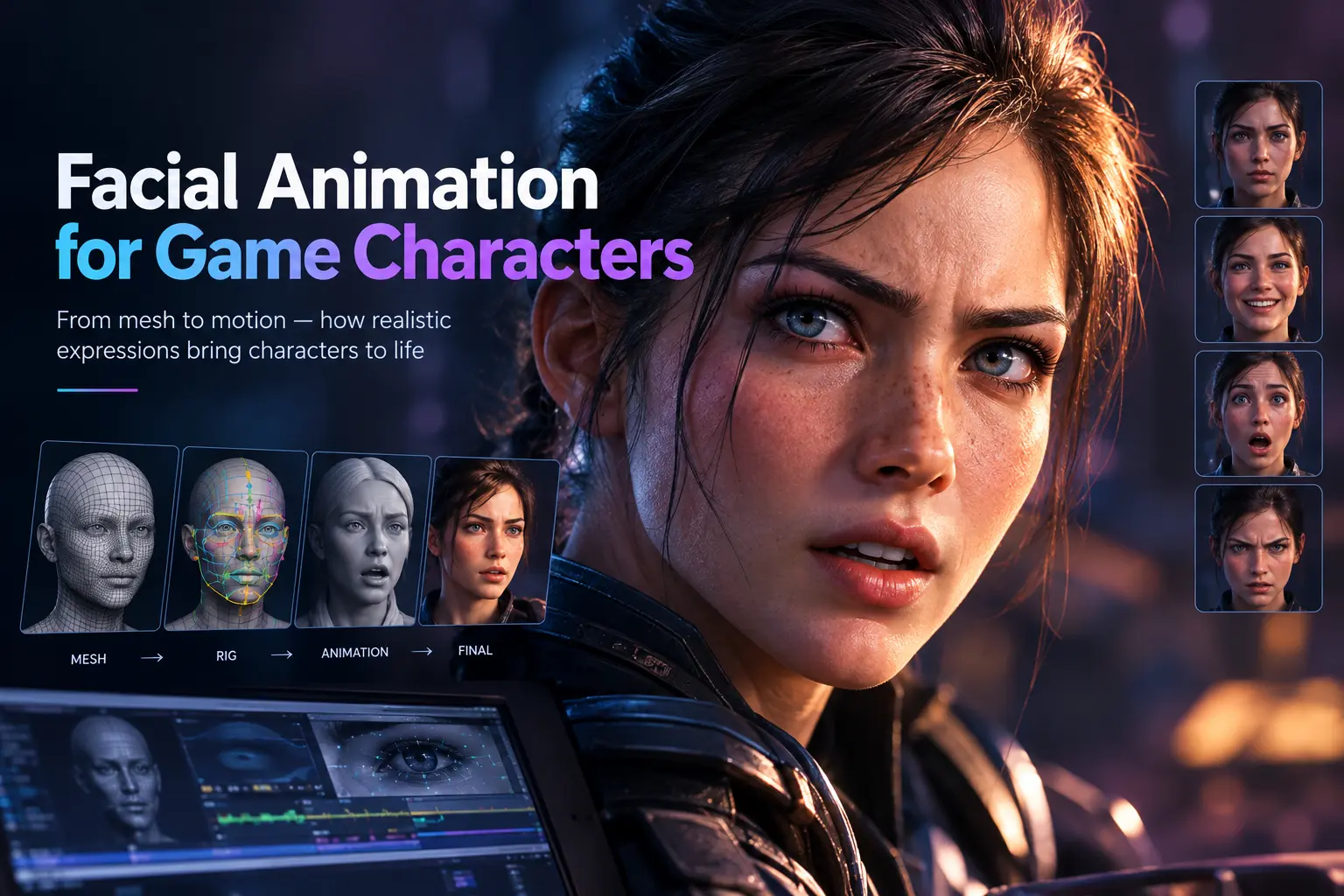
A player will forgive a stiff run cycle. They will forgive a slightly muddy texture. A dead-eyed stare during the emotional climax of a story is a different matter, because the face is the one place every human on earth is an expert reviewer. We read faces before we read words, and we have been doing it since infancy. That is the standing challenge of game facial animation: the audience arrives with a lifetime of training and zero patience for errors.
This guide covers how facial animation for games is actually built, from the mesh and the rig to lip sync, capture, and the budget decisions that decide which characters get a full performance and which get a simple blink loop. It also covers the failure modes, because the uncanny valley is rarely caused by one big mistake. It is usually five small ones stacked together.
The Uncanny Valley Tax
In 1970, the robotics professor Masahiro Mori proposed that as a figure becomes more humanlike, our affinity for it rises until a point near realism, where it drops sharply before recovering at full human likeness. He called the dip the uncanny valley. Game developers have been paying the toll ever since.
The practical lesson is that realism raises the bar instead of lowering the risk. A stylized character with simple, confident expressions gets read as intentional. A near-photoreal character with a lip sync that lags by three frames, eyes that never saccade, and a smile that moves only the mouth gets read as wrong, and players feel it before they can explain it. Every production decision below should be made with this asymmetry in mind: the closer a face is to real, the more of the full system it needs.
The Four Layers of a Facial System
A convincing face is a stack. Weakness in any layer shows up on screen, and polish in the top layer cannot rescue a broken bottom one.
Layer one is the mesh. Topology decides how a face can deform. Edge loops need to follow the orbicularis oculi around the eyes and the orbicularis oris around the mouth, because those loops are what let eyelids close cleanly and lips purse without collapsing. A head sculpted for a still render and then handed to a rigger often needs retopology before it can move at all. This is why 3D character modeling and animation planning belong in the same conversation from day one.
Layer two is the rig. This is the control structure that turns a mesh into something an animator can pose. Faces are rigged with bones, with blend shapes, or with a hybrid of both. The rig defines the vocabulary of expressions a character can speak.
Layer three is the animation data. Where the performance comes from: hand-keyed curves, motion capture from a performer, procedural systems, or audio-driven solvers. Most shipped games blend several sources.
Layer four is runtime behavior. The always-on systems that make a face look inhabited even when no scripted performance is playing: blinking, eye darts, head micro-movement, breathing, and the transitions between expressions. Humans at rest blink roughly 15 to 20 times a minute, and a character that blinks too rarely or on a perfect metronome reads as a mannequin. This layer is cheap to build and routinely skipped.
Bones Versus Blend Shapes
The central technical decision in building a face is how it deforms. Neither approach wins everywhere, which is why hybrids dominate production.
| Approach | Strengths | Limitations | Best Fit |
| Bone-driven | Lighter on runtime cost, easy to retarget, compact data | Deformation can look angular, struggles with fine skin detail and wrinkles | Mobile titles, background characters, stylized designs |
| Blend shapes (morph targets) | Excellent visual quality, sculpted exactly as an artist intends, GPU-friendly | Cost scales with active shapes and vertex count; wrinkles often need corrective shapes | Hero characters, cinematics, close-up dialogue |
| Hybrid | Bones for jaw, eyes, and gross movement; blend shapes for fine expression | Needs a technically fluent rigger and a careful solver | Most AAA and mid-tier narrative games |
The runtime cost point matters more than newcomers expect. Blend shape evaluation cost grows with the number of simultaneously active shapes and the vertex count of the head, so a rig with eighty shapes on a very dense mesh can be expensive on constrained hardware. Bones are cheaper to evaluate, though a bone-only face tends to read as rubbery around the mouth. The hybrid pattern solves this by letting a few bones handle large motion, such as the jaw hinge and eye rotation, while blend shapes handle the subtle work around the lips, cheeks, and brows.
Markerless Motion Capture: A Real Alternative Now
Traditional optical motion capture relies on reflective markers and a dedicated camera array, a setup requiring a specialized studio space most smaller teams can’t justify building or renting regularly. Markerless motion capture has matured substantially, using computer vision and depth sensing to track a performer’s movement without any physical markers at all, sometimes from standard video footage alone.
The tracking accuracy gap between markerless and traditional marker-based systems has narrowed considerably, though marker-based capture still generally holds an edge for fast, complex movement where tracking precision matters most, combat choreography with rapid direction changes being a common example. Markerless systems have opened mocap up to teams that previously couldn’t access the discipline at all, and for many character movement needs, especially simpler locomotion and non-combat performance, the quality gap has become small enough to matter less than the dramatically lower barrier to entry.
Facial Rigging and the Vocabulary of an Expression
Most modern face rigs trace their logic back to the Facial Action Coding System, developed by Paul Ekman and Wallace Friesen, which breaks facial movement into roughly 44 action units, each tied to a specific muscle or muscle group. FACS gave animators a shared language: a sincere smile is the zygomatic major pulling the lip corners while the orbicularis oculi crinkles the eyes, and a smile missing the second half reads as polite or fake.
That framework shaped the blend shape sets used across the industry. Apple’s ARKit face tracking on TrueDepth-equipped iPhones outputs 52 blend shape coefficients per frame, covering eyes, brows, jaw, cheeks, nose, and a large share of mouth shapes. Because it is a de facto standard, many studios build their facial rigs around the same 52-shape vocabulary so that an inexpensive iPhone capture can drive any character directly. Production-grade hero rigs commonly run larger, often in the 50 to 80 shape range once corrective shapes and custom expressions are added.
Corrective shapes deserve a note of their own. When two expressions combine, such as a wide smile and a jaw drop together, the linear sum of the two shapes can produce a pinched or collapsed result at the corner of the mouth. A corrective shape fires only when that specific combination is active and repairs the geometry. Good rig work is largely an exercise in finding and fixing these combinations before an animator discovers them mid-scene.
Three rigging checks catch most problems early:
- Extreme combinations. Push every pair of strong shapes together and look for pinching, intersection, and lip penetration.
- Asymmetry. Real faces are not symmetric, and a rig that can only move both sides identically produces robotic acting. Left and right controls should be independent.
- Skinning limits on the engine side. Unity’s default skin weight setting caps influence at four bones per vertex. A face rig authored with more influences in the DCC tool will deform differently once imported, so test the real in-engine result.
Character Expressions Live Above the Mouth
New teams pour effort into the mouth because dialogue makes it visible. Players, however, read emotion from the upper face first. Brows, eyelids, and the squint of the lower lids carry nearly all of the sincerity signal in a human expression, and they are the layer that separates a performance from a puppet.
Practical rules that improve character expressions at almost no cost:
- Lead with the eyes. In a shift of emotion, the eyes and brows move first, and the mouth follows a few frames later. Reversing that order reads as fake.
- Use eye darts and saccades. Eyes that fixate perfectly still for seconds look dead. Small, quick glances toward points of interest, then back, make a character appear to be thinking.
- Layer lid behavior on top of gaze. Upper lids follow the eyeball when it looks up or down. A rig where lids stay frozen while the eyes rotate is a classic tell.
- Avoid symmetrical smiles. A real half-second asymmetry between the left and right corners of a smile sells the moment.
- Hold expressions long enough to read. In gameplay, camera distance and motion are working against legibility, so exaggerate slightly more than feels natural in a close-up viewport.
Stylized characters follow the same principles with larger amplitudes. A cartoon hero with oversized brows is relying on exactly the same upper-face logic. The craft transfers across art styles even when the vocabulary changes, which is part of why strong character design work starts by defining how a face is supposed to move before anyone sculpts the final model.
Lip Sync Animation: Visemes, Languages, and Audio-Driven Solvers
Lip sync animation maps speech sounds to mouth shapes. The unit of mouth shape is the viseme, a visual equivalent of a phoneme. Several different phonemes look identical on the lips, such as “p,” “b,” and “m,” so a viseme set is much smaller than a phoneme set. A minimal viseme set for English sits around 15 shapes, which is why the Oculus Lipsync system and many other real-time tools use that same number.
There are four common production approaches:
- Hand-keyed. An animator sets mouth shapes against the audio. Highest control, slowest, reserved for hero moments.
- Audio-driven automatic. Software analyzes the audio waveform or transcript and produces viseme curves, which an animator then cleans up. Tools in this family include Oculus Lipsync, SALSA for Unity, and NVIDIA’s Audio2Face.
- Performance capture. The actor’s face is recorded while speaking, and lip movement comes directly from the capture. Highest fidelity for dialogue-heavy story scenes.
- Hybrid. Automatic lip sync as a base layer, with performance capture or hand-keying on top for key emotional beats.
Localization is the factor teams forget until it is expensive. A game shipping in eight languages needs mouth movement that suits each dub, with the original recording as just one of eight cases. Performance-captured facial animation tied to English audio does not transfer to a German or Japanese recording, because the mouth shapes and timing differ. Studios planning multilingual releases tend to choose audio-driven lip sync as the baseline precisely because it can regenerate against any language’s audio, then reserve hand polish for story-critical scenes.
A final detail matters here: lip sync is more than mouth shapes. Jaw, tongue, cheek, and lip corner movement all follow speech rhythm, and the head tilts and brow lifts that accompany emphasis in real speech give a line its meaning. Mouth-only lip sync looks like a ventriloquist’s dummy.
Capturing Performance: From iPhone to Head-Mounted Rigs
Facial capture has become dramatically more accessible over the past several years, and the choice now comes down to fidelity against cost.
| Capture Method | Typical Hardware | Strength | Trade-off |
| iPhone with ARKit | TrueDepth camera, free or low-cost apps | Cheap, fast iteration, 52-shape output | Lower fidelity on subtle mouth and eye detail |
| MetaHuman Animator | iPhone or stereo head-mounted camera footage, Unreal Engine | High-quality animation from video for MetaHuman rigs | Tied to the Unreal and MetaHuman workflow |
| Faceware | Head-mounted or video-based capture, professional pipeline | Used in major commercial productions including Call of Duty and NBA 2K | Licensed professional tooling and trained operators |
| Marker-based facial capture | Studio camera arrays with markers on the face | Highest accuracy | Requires a capture stage and a specialized crew |
Capture solves the raw performance problem, though it does not remove the need for an animator. Raw facial capture data contains jitter, solver errors around the lips, and eye behavior that needs correcting. The cleanup pass is where a facial animator fixes lip contact on bilabial sounds, rebalances brows, adds eye darts the solver missed, and retargets the performance to a character whose face proportions differ from the actor’s. Budgeting capture without budgeting cleanup is the most common way a dialogue-heavy production goes over schedule, a pattern that mirrors what happens in body animation and is covered in more depth in our guide to motion capture for game development.
Tiering the Cast: Where the Budget Should Go?
Not every character in a game needs a cinematic face. Spending hero-level facial work on a shopkeeper who speaks four lines is a budget leak, and starving the protagonist of nuance is a story leak. Tiering fixes both.
| Tier | Who | Typical Approach |
| Hero | Protagonist, key companions, major antagonists | Full rig with corrective shapes, performance capture, hand cleanup, bespoke expressions |
| Supporting | Recurring story characters | Shared rig family, audio-driven lip sync with selective hand polish |
| Ambient | Crowds, shopkeepers, background NPCs | Bone-driven or simplified blend shapes, procedural blinking, generic lip sync |
The tiers also serve production. Hero characters get the time for iteration and review. Supporting characters share a rig structure so a single set of animation tools and clips works across the cast. Ambient characters get automation. Assigning tiers during pre-production, rather than discovering the cost mid-project, is one of the most reliable ways to keep a facial animation budget from running away.
Performance Budgets on Real Hardware
Facial systems are expensive per vertex, and heads tend to be the densest part of a character. A few practical controls keep costs sane on consoles and especially on mobile.
- Facial LODs. Distant characters should drop to a reduced rig with fewer shapes or bones. A player standing several meters away cannot see eyelid detail, so there is no reason to pay for it.
- Active shape limits. Cost follows the number of blend shapes evaluated at once. Rigs that drive eighty shapes every frame for a character in the background are wasting budget.
- Skin weight caps. Four influences per vertex is a common ceiling for real-time engines, and limiting the face to that during authoring avoids surprises.
- Update throttling. Off-screen or distant faces can update their solvers less often without visible quality loss.
- Data size. Capture-driven facial curves are dense. Compression and sensible keyframe reduction keep a large cast of animated dialogue from bloating a build.
Mobile projects feel these limits first, but any game with a crowd scene or a long cutscene library hits the same wall eventually. If the target platform includes mobile, plan the rig around the weakest device from the start, and treat facial LODs as a design requirement rather than a late optimization. The same logic applies when 3D characters are modeled in the first place, since polygon distribution around the face decides how cheaply it can deform later.
Cobweb Games’ Approach to Facial Animation
Every facial animation engagement starts with a cast review: which characters carry story, how much dialogue each speaks, which languages the game ships in, and what the target hardware can afford. That review decides the rig style, the capture method, and the tier for each character before any asset gets built. Studios working with Cobweb Games on 3D animation get a facial pipeline sized to the actual project instead of a one-size rig applied to every character.
Projects that also need character art and modeling benefit from planning the face topology and the rig together, since a head built without deformation in mind is the most common source of expensive rework. Our game animation work covers the full chain, from rig setup to in-engine integration, so the expressions an animator builds are the expressions players actually see.
Common Mistakes in Facial Animation for Games
Spending the budget on the mouth and ignoring the eyes. The upper face carries the emotional signal. A lip sync of perfect timing on a character with frozen eyes still reads as dead.
Choosing capture without planning cleanup. Raw facial capture needs a skilled pass before it ships. Budgeting the shoot day and forgetting the cleanup is the classic overrun.
Authoring lip sync against one language only. A game that ships in several languages needs a plan for regenerating mouth movement per dub.
Skipping corrective shapes. Pinched mouth corners and collapsing lips are the most visible rig bugs, and they only appear in combination poses.
Building the head for a render instead of for deformation. Topology that looks good in a still can fall apart the moment the jaw opens.
Giving every character the same rig complexity. Tiering the cast by story importance is the single biggest lever on cost.
Ignoring runtime behavior. Blinks, eye darts, and breathing cost almost nothing to build and add more life than most expensive features.
Frequently Asked Questions
What is the difference between facial rigging and facial animation?
Facial rigging is the construction of the control system that lets a face move, using bones, blend shapes, or both. Facial animation is the performance created with that rig, which can be keyed by hand, captured from an actor, or generated from audio.
How many blend shapes does a game character’s face need?
It depends on the tier. Apple’s ARKit standard uses 52, which covers the core vocabulary and is common for mid-tier and mobile-friendly rigs. Production-quality hero rigs often run between 50 and 80 once corrective and custom shapes are added.
Is audio-driven lip sync good enough for a shipped game?
For many characters, yes. Audio-driven tools produce a solid baseline and regenerate for any language, which is ideal for supporting and ambient cast. Story-critical scenes usually add performance capture or hand polish on top.
Can an iPhone really capture usable facial animation?
Yes, for the right use. ARKit capture is inexpensive and fast, making it strong for prototyping, indie productions, and supporting characters. Hero scenes often need higher-fidelity capture or substantial animator cleanup.
Why do some realistic game faces look creepy?
Usually several small flaws compound: delayed lip sync, frozen eyes, symmetric smiles, and missing micro-movement. The uncanny valley responds to the whole system, so fixing one layer rarely solves it.
Do mobile games need facial animation?
Many do not need full facial performance, though expressions still help. Bone-driven rigs, small shape sets, and simple blink and look-at behavior give mobile characters personality while staying inside tight performance budgets.
