Android holds the largest mobile installed base on the planet, and that scale is exactly what makes Android game development both the biggest opportunity and the messiest technical challenge in mobile gaming. A game that runs perfectly on a flagship device can stutter badly on a three-year-old mid-range phone, and both devices might be running the exact same Android version. Building for this platform means designing for fragmentation from day one, not patching around it after launch.
This guide walks through the practical decisions that shape an Android project: engine choice, graphics API selection, performance tooling, and what Google Play actually requires before a game can reach players. It’s written for teams evaluating how to approach a new Android title, not as a line-by-line coding tutorial.
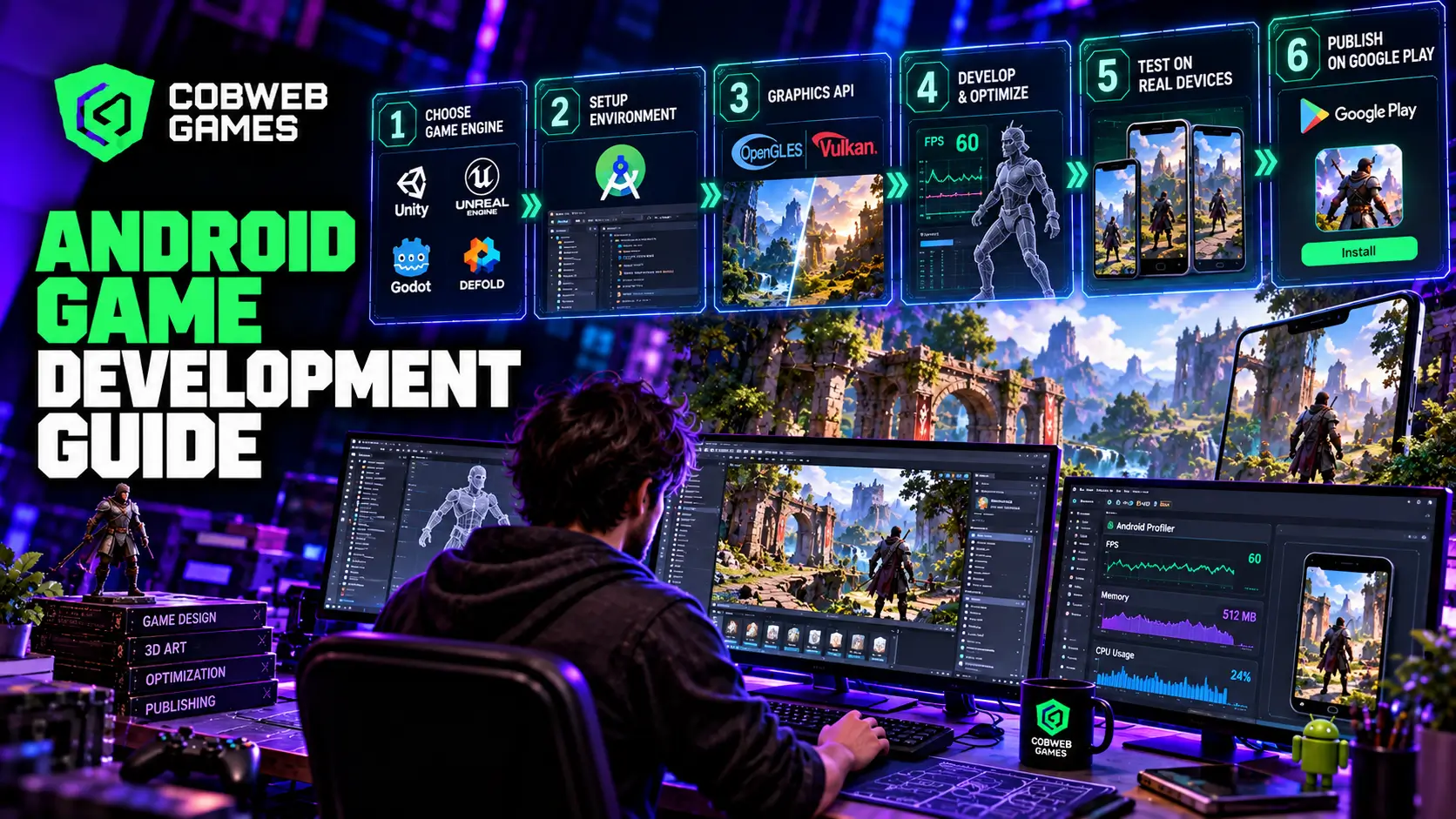
Choosing an Engine for Android
The engine decision shapes nearly every downstream choice in an Android project, so it deserves real scrutiny rather than a default pick.
| Engine | License Type | Primary Language | Best Fit |
| Unity | Commercial | C# | General-purpose development, strong 2D and 3D support |
| Unreal Engine | Commercial | C++, Blueprint | High-end 3D visuals, larger production budgets |
| Godot | Open source | GDScript, C#, C++ | Cross-platform indie projects, tighter budgets |
| Defold | Open source | Lua | Lightweight 2D games |
Unity engine game based development remains the most common choice for Android game developers specifically because of its mature Android toolchain, large asset ecosystem, and the sheer volume of existing documentation and community knowledge available when something breaks. Unreal Engine game development makes sense when a project genuinely needs console-quality 3D rendering on Android, though its heavier runtime footprint means it demands more careful optimization to hit acceptable frame rates on mid-range hardware.
Godot has grown considerably as a serious option, particularly for smaller teams that want a fully open-source pipeline without licensing costs eating into a tight budget. It handles 2D work especially well and has closed much of the gap with Unity for straightforward 3D projects.
Game engines exist specifically to handle the infrastructure work a team shouldn’t be rebuilding from scratch: graphics rendering, animation systems, audio, physics, and input handling across the enormous range of Android hardware in the market. Choosing to build without one is rarely the right call outside of highly specialized technical projects.
Setting Up the Development Environment
Android Studio is the primary IDE for Android game development, and it’s worth treating as the default starting point even for teams building primarily in a third-party engine. It provides the Android SDK management tools, native debugging support for C and C++ code, and the build pipeline needed to package and deploy a game to physical devices or emulators for testing.
Teams working on C++-heavy projects, particularly those originating on other platforms, sometimes use Visual Studio with the Android Game Development Extension instead, which supports distributed build systems and targets projects that already have substantial native code investment. This path makes more sense for larger, established codebases than for a new project starting from scratch on Android specifically.
Either path eventually connects back to the Android NDK for teams that need native code performance beyond what managed engine scripting layers provide, typically for computationally heavy systems like custom physics simulations or specialized rendering techniques.
Graphics APIs: OpenGL ES and Vulkan
Android game development requires choosing a graphics API, and the two supported options each come with real tradeoffs.
OpenGL ES has been the default for years and remains widely supported across nearly every Android device still in active use. It’s a mature, well-documented standard with broad tooling support, which makes it a safe choice for teams without deep low-level graphics programming experience on their team.
Vulkan offers lower-level control and meaningfully better performance potential, particularly for graphically demanding projects, but that control comes with real complexity cost. Vulkan requires more explicit management of GPU resources and synchronization than OpenGL ES does, which raises the bar for the engineering team building on top of it. Most teams working through Unity or Unreal don’t interact with this choice directly since the engine abstracts it, but teams building custom native rendering pipelines need to weigh this tradeoff deliberately.
Both APIs work with the Android GPU Inspector for profiling, so the choice doesn’t lock a team out of proper performance analysis tooling either way.
Performance Tools Every Android Team Should Know
Android’s tooling ecosystem for performance profiling has matured significantly, and ignoring it is one of the most common mistakes newer Android game developers make.
- Android Vitals surfaces crash rates, ANRs (application not responding events), slow session data, and low memory killer incidents directly tied to real player devices, not just test hardware.
- Android GPU Inspector (AGI) provides frame-level profiling, breaking down texture and vertex processing costs so a team can pinpoint exactly where rendering time is going.
- Android Performance Analyzer (APA) handles broader system tracing across frame times and memory efficiency, useful for catching issues that aren’t purely GPU-bound.
- Android Performance Tuner (APT) helps manage fidelity parameters and quality tiers dynamically, letting a game scale visual settings automatically based on the specific device it’s running on.
- The Frame Pacing Library integrates with OpenGL ES or Vulkan to keep frame delivery consistent, which matters enormously for perceived smoothness even when the average frame rate number looks fine on paper.
Teams building serious mobile game development pipelines treat these tools as standard practice throughout production, not as a late-stage fix applied only after players start complaining about performance in reviews.
Handling Device Fragmentation
This is the single biggest practical challenge specific to Android that iOS developers rarely deal with to the same degree. Android’s install base spans an enormous range of GPU capabilities, RAM configurations, screen sizes, and form factors including phones, tablets, foldables, and even cars, TVs, and Wear OS devices.
The Android Dynamic Performance Framework (ADPF) helps address this at the system level, offering thermal monitoring and a Game Mode API that lets a device intervene dynamically when a game is pushing hardware past sustainable thermal limits. Building support for this into a title helps prevent the kind of severe thermal throttling that tanks frame rate mid-session on lower-end hardware.
Memory management deserves particular attention for Android game developers specifically, since low memory killers will forcibly terminate a game that exceeds available memory on constrained devices, an experience that reads to players simply as a random crash. Continuous memory monitoring throughout development, rather than a single check near launch, catches these issues while they’re still cheap to fix.
64-bit architecture support is now a hard requirement rather than an optional optimization, and any Android game development company still shipping 32-bit-only builds will find their app rejected outright during the Google Play submission process.
Google Play Requirements and Distribution
Getting a finished build onto devices involves more than uploading an APK. Google Play has specific packaging and integration requirements that Android game development teams need to account for well before a planned launch date.
Android App Bundle (AAB) is now the required distribution format rather than a legacy APK, allowing Google Play to generate optimized delivery packages for each specific device configuration rather than shipping a one-size-fits-all file to every device.
Play Asset Delivery manages larger content packages efficiently, letting a team separate core gameplay assets from optional content that can download on demand, which keeps initial install size manageable even for content-heavy titles.
Play Integrity API provides security verification against tampering and unauthorized app modification, increasingly important for titles with any real-money or competitive component.
Google Play Games Services handles cross-platform save synchronization, friends and social features, leaderboards, and achievements through a consistent API available across Java, Kotlin, C++, and a dedicated Unity plugin, saving teams from building this infrastructure from scratch.
Kotlin’s Role in Modern Android Projects
While most Android game developers build primarily through an engine’s own scripting language, Kotlin has become the standard choice for any native Android-side code a project needs, such as platform-specific integrations, custom UI overlays outside the game engine, or backend service connections. Kotlin’s interoperability with existing Java-based Android libraries, combined with more modern language ergonomics, has made it the default recommendation over Java for new native Android work, including in official Android documentation and sample projects.
Teams building custom native tools around their game, rather than working purely inside an engine’s own ecosystem, benefit from Kotlin’s safety features specifically around null handling, which eliminates an entire category of crashes common in older Java-based Android codebases.
Cost Considerations for Android Projects
Android game development costs vary enormously based on scope, but a few structural factors consistently drive the biggest swings in budget.
- Device testing coverage. Supporting a wide range of Android hardware requires either owning a substantial physical device lab or paying for cloud-based device testing services, and skipping this step reliably produces expensive post-launch bug reports instead.
- Art and animation complexity. Higher-fidelity visual targets increase both production time and the technical art optimization work needed to hit performance targets across the full device range.
- LiveOps and post-launch support scope. A title planning ongoing content updates and events needs backend infrastructure budgeted from the start, not added as an afterthought once the game is already live.
- Team composition. Building entirely in-house, fully outsourcing, or blending internal creative direction with outside production support all carry different cost structures, and the right mix depends heavily on a studio’s existing capacity and the project’s specific technical demands.
Teams evaluating game development partners for an Android title should scope these cost drivers explicitly during pre-production rather than discovering them mid-project, since device fragmentation testing in particular tends to surprise teams that haven’t budgeted for it properly. Before choosing the game development company, make sure to ask the right questions always discuss about the full scope.
Monetization Models and Their Technical Implications
The monetization approach a title chooses has real downstream technical consequences that often get decided too late in production. Free-to-play titles with in-app purchases need robust backend infrastructure for transaction validation, receipt verification, and fraud prevention, none of which can be bolted on convincingly after launch without significant rework. Ad-supported titles need careful integration work to avoid ad SDKs bloating install size or introducing their own crash and performance risks, since a poorly integrated third-party ad network can undo months of careful optimization work elsewhere in the build.
Premium, pay-once titles carry a lighter backend burden but face a different pressure: players expect a more polished, complete experience at launch since there’s no ongoing engagement model to smooth over rough edges post-release. Subscription-based titles sit somewhere between the two, needing reliable entitlement checking and account systems but without the constant transaction volume that free-to-play monetization generates.
Whichever model a team chooses, Google Play Billing integration needs early technical planning, not a late addition. Teams that treat monetization plumbing as a final pre-launch task frequently discover integration issues with edge cases like refunds, subscription upgrades, or promotional codes only after players start filing support tickets.
Localization and Regional Considerations
Android’s global reach means localization decisions affect technical architecture far more than teams expect going in. Text expansion in translated languages can break UI layouts that were only tested in English, so building flexible, non-hardcoded UI systems from the start saves substantial rework later when a title expands into new markets.
Google Play’s regional distribution rules also affect technical decisions around content delivery and pricing. Some regions have specific requirements around data handling and privacy disclosures that need to be built into an app’s architecture rather than patched in after the fact, particularly given how frequently platform policy around data collection has tightened in recent years.
Performance expectations also vary meaningfully by region, since device tiers common in some markets skew considerably lower-end than in others. A title targeting broad global reach on Android needs to budget performance testing specifically against the hardware profile common in its actual target markets, rather than assuming a single reference device represents the whole player base.
A Practical Pre-Launch Checklist
Before submitting a build to Google Play, a few checks consistently catch the most common last-minute problems.
- Confirm the build targets the required minimum API level and includes 64-bit support across all native libraries.
- Run Android Vitals against a beta test group spanning multiple device tiers, not just flagship hardware.
- Verify the Android App Bundle builds correctly and generates appropriately sized delivery packages for varied device configurations.
- Test thermal behavior during extended play sessions on mid-range hardware specifically, since this is where throttling issues appear first.
- Confirm Play Integrity API integration if the title has any competitive or monetized component that needs tamper protection.
Working With Outside Production Support
Studios building an Android title without a large internal team often bring in outside support for specific production bottlenecks: character and environment art, animation, or UI design work that would otherwise slow down a small internal team trying to hit a launch date. This is a common and often sensible approach, particularly for studios whose core strength is game design and systems work rather than large-scale art production.
The key to making this work well is keeping technical constraints, performance budgets, texture resolution tiers, and platform-specific requirements clearly documented and shared with any outside team from the start. Art or animation produced without those constraints in mind almost always needs rework once it’s actually integrated and profiled on target Android hardware, which costs far more time than establishing the standard up front would have.
Studios that get this right treat outside production partners as an extension of their own pipeline rather than a separate, disconnected workstream, with the same technical review process applied to outsourced assets as to internally produced ones before anything is merged into a production build.
Frequently Asked Questions
Is Unity or Unreal Engine better for Android game development?
Unity generally offers a smoother path for most Android projects because of its mature toolchain and lighter runtime footprint. Unreal Engine makes more sense specifically for high-end 3D visuals where a team has the technical resources to manage its heavier performance demands on mid-range Android hardware.
Do Android games need to support both OpenGL ES and Vulkan?
Not necessarily. Most engine-based projects don’t require choosing directly, since the engine abstracts the graphics API layer. Teams building custom native rendering pipelines need to choose deliberately based on their performance needs and available engineering expertise.
How much does Android device fragmentation actually affect development timelines?
Significantly, particularly for graphically ambitious titles. Budgeting real time for testing across a representative device spread, rather than only high-end hardware, is one of the most reliable ways to avoid a rough post-launch bug wave.
Is Kotlin required for Android game development?
No, most engine-based projects rarely touch Kotlin directly. It becomes relevant specifically for custom native Android integrations outside the engine’s own scripting layer.
What’s the biggest mistake new Android game development teams make?
Testing primarily on flagship devices and assuming performance will scale down proportionally to mid-range and budget hardware. It rarely does, and the gap tends to surface only after a broader public launch rather than during a limited internal test.
